VoIP (Voice over Internet Protocol) is a modern communication technology that enables voice and multimedia interactions over the internet, eliminating the need for traditional phone lines. By integrating VoIP with servis.ai, businesses can enhance customer interactions, improve efficiency, and reduce operational costs.
This article serves as a central hub for all supported properties and features of each available VoIP integration.
Navigate to VoIP
Go to Settings > Integrations > VoIP and select the Enable VoIP Calling checkbox.
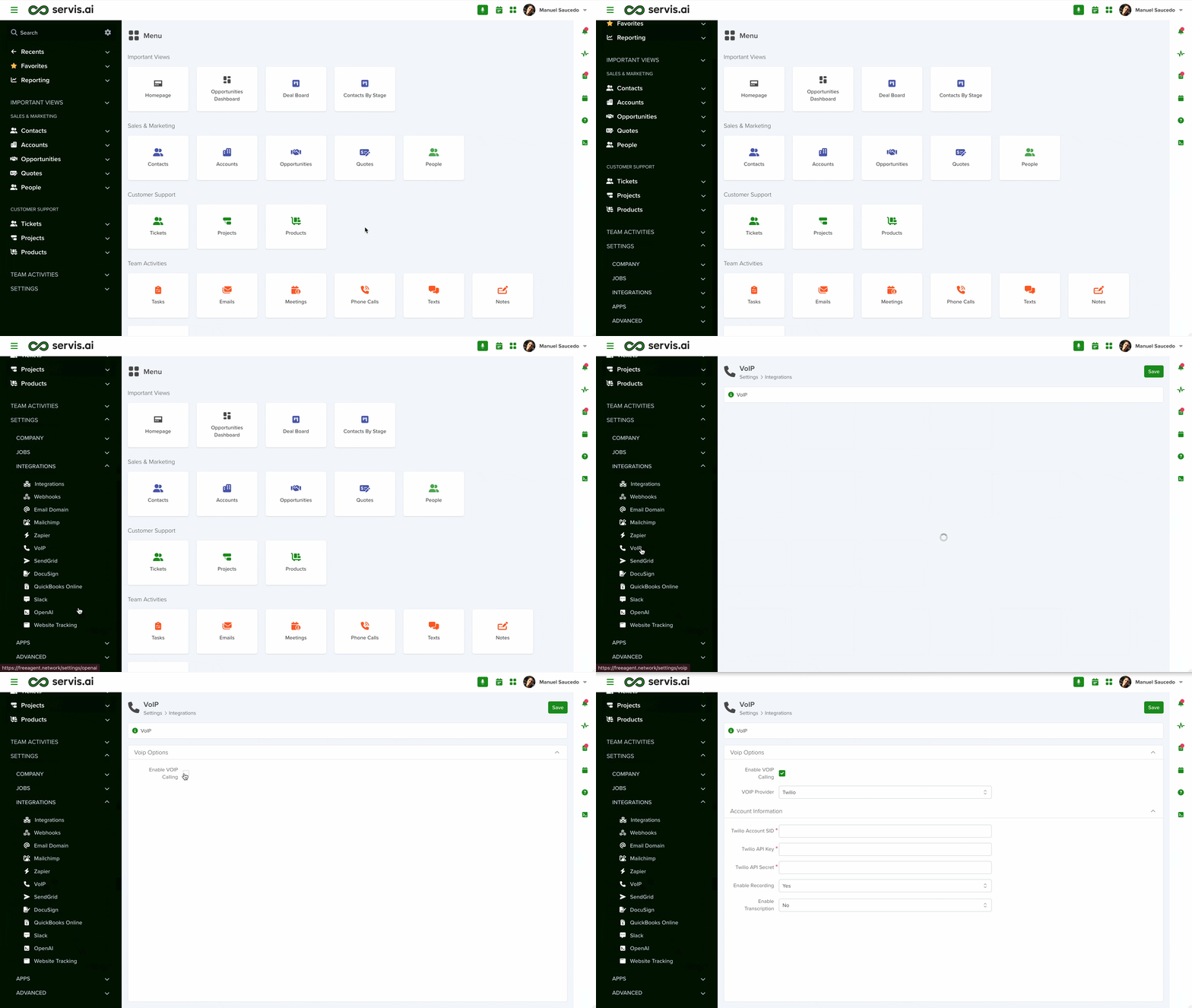
Once you access this section, the information will automatically display the default supported provider, Twilio. You can switch providers using the VoIP Provider dropdown.
Supported Providers
To ensure seamless VoIP integration, servis.ai supports leading providers, including:
- Twilio – A cloud-based communications platform offering powerful APIs for voice, messaging, and video.
- RingCentral – A complete VoIP solution with cloud phone systems, video conferencing, and team messaging.
- Netlink – A trusted provider known for high-quality voice services and reliable business communication.
- Zoom – Known for video conferencing, Zoom also provides VoIP capabilities through its cloud-based phone system.
- GoTo – A flexible VoIP solution (formerly LogMeIn) for calling, messaging, and meetings.
Requirements for Each Provider
Each provider has its own set of integration requirements. Links to dedicated setup articles are included for each provider below.
Twilio

-
Twilio Account SID (Required)
- A unique identifier for your Twilio account used for authentication.
-
Twilio API Key (Required)
- A security credential that allows your application to interact with Twilio APIs.
-
Twilio API Secret (Required)
- A private key used with your API Key for secure authentication.
-
Enable Recording
- Choose whether VoIP calls should be recorded (Yes/No).
-
Enable Transcription
- Choose whether recorded calls should be transcribed (Yes/No).
You can learn more here.
RingCentral

-
Enable Fax
- Enable or disable fax functionality.
-
Is Authorized
- Indicates if your account is successfully authorized.
-
Last Authorized
- Shows the most recent authorization timestamp.
-
Connected Phone Number
- The phone number used for calls and SMS.
-
Import All Logs
- Enable importing of calls, SMS, and fax records.
-
Enable Import Phone and SMS
- Select what data to import (e.g., contacts).
You can learn more here.
Netlink

-
Server URL (Required)
- The URL used to connect to the Netlink server.
-
API Key (Required)
- Used to authenticate API requests.
-
SMS Phone Number (Required)
- Used for sending and receiving SMS messages.
-
User ID (Required)
- Identifies the Netlink user account.
You can learn more here.
Zoom

-
Is Authorized
- Indicates whether the Zoom account is authorized.
-
Last Authorized
- Shows the last successful authorization.
-
Phone Numbers
- Numbers linked to Zoom for calling/SMS.
-
Enable Auto-Sync
- Controls automatic syncing of calls and SMS data.
You can learn more here.
GoTo

-
Enable Fax
- Enable or disable fax functionality.
-
Client ID (Required)
- Used for API authentication.
-
Client Secret (Required)
- Used securely with Client ID.
-
Enable Auto-Sync
- Controls syncing of call and SMS data.
-
Is Authorized
- Indicates authorization status.
-
Last Authorized
- Shows last authorization timestamp.
You can learn more here.


