The apps you use—and the relationships between them—determine how your information is managed in servis.ai.
FAQs
What is an App?
An app is a customizable data-capturing tool that stores and organizes information, similar to a collection of spreadsheets. See here to learn more.
Can I customize Apps in servis.ai?
Yes. You can customize nearly every aspect of an app in the App Settings.
Can I create my own Apps in servis.ai?
Yes. See our article How to Create a Custom App – Part 1.
Note: We recommend speaking with your account manager before creating custom apps.
Can I control who has access to an App?
Yes. Roles & Access Control Lists allow you to define who can access an app and what actions they can perform.
Can I integrate third-party software with Apps?
Yes. servis.ai integrates with a variety of third-party tools, including email marketing systems, accounting software, and analytics platforms.
How do Apps work together?
Learn more in the App Relationships section.
How do I deactivate apps?
Go to Settings → Apps → [Your App] and click Deactivate App.
Deactivation does not delete the app or its records—it simply disables them. You can manage them under Settings → Apps → Deactivated Apps.
How do I delete an app?
First, deactivate the app, then go to Settings → Apps → Deactivated Apps and click Delete App.
What is an App?
An app is a customizable data-capturing tool that organizes information like a spreadsheet.
For example, each contact record in the Contacts App represents a row of structured information.
Unlike spreadsheets, apps can share data, creating a network of interconnected information.
B2B Sales Apps
Below are common apps in a B2B sales setup:

Contacts
Stores individual people linked to accounts, including their name, title, and contact details.
Accounts
Stores company-level data such as company name, location, and industry.
Opportunities (Deals)
Tracks deal progress, including stage, type, and related account.
Quotes
Stores quote details such as stage, dates, and payment terms.
Products
Maintains product information, including name, description, and price.
Projects
Tracks projects tied to accounts, including status and estimates.
Tickets
Manages support or service tickets with details like type and priority.
App Relationships
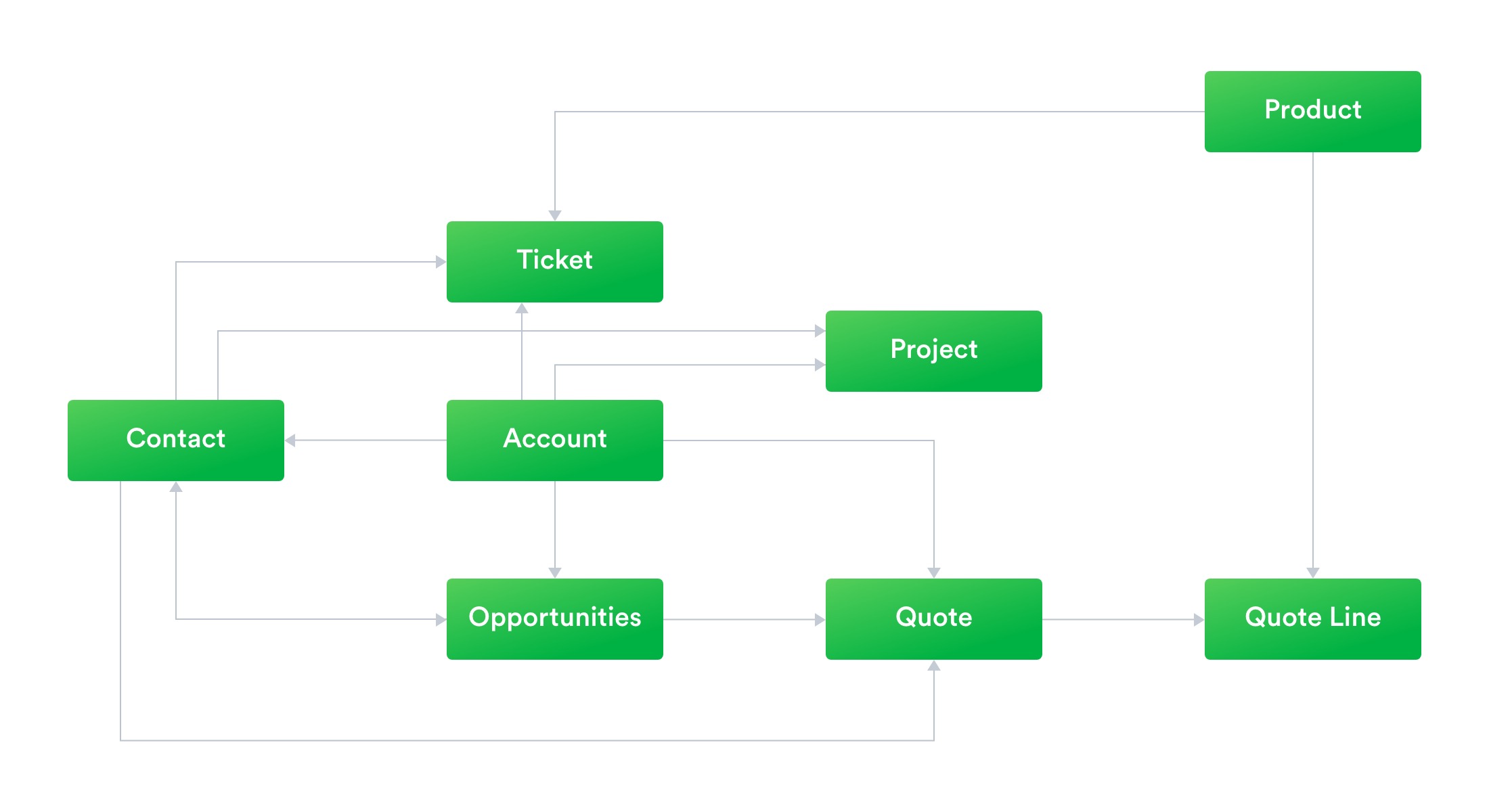
App relationships define how data connects across your system and form the foundation of workflows and processes.
Understanding these relationships is essential for organizing and managing your data effectively.
Parent–Child Relationships
- The Accounts App is the parent of Contacts, Deals, Projects, Quotes, and Tickets.
- Each child record must be associated with a specific account.
Benefits
- Centralized data and a single source of truth
- Simplified navigation across related records
- Reduced duplication
- Support for automated workflows
Example: Updating a deal can trigger workflows tied to its account.
One-to-Many Relationships
- One record can be linked to multiple related records.
Example: One account can have multiple contacts, but each contact belongs to only one account.
Many-to-Many Relationships
Records from two apps can be linked to multiple records in each other.
Example: Contacts and opportunities can both be linked to multiple records.
Benefits
- Improved collaboration
- Greater visibility into relationships
- More powerful reporting
Customizing Apps
You can customize nearly every aspect of an app, including its design, fields, permissions, and workflows.
- Improved data capture: Tailor fields to your business needs.
- Better process alignment: Reflect your workflows in your setup.
- Enhanced reporting: Build meaningful dashboards and insights.
Learn more in the App Settings article.
Creating Custom Apps
Before creating a custom app, consider the following:
- Identify the need: Define the process or data you want to manage.
- Plan structure: Decide on fields and relationships with other apps.
Once you’re ready, follow How to Create a Custom App – Part 1.


